Privnote Best Practices for Sharing Sensitive Updates
When Privnote Actually Makes Sense
Privnote works best when you need to pass along a small piece of sensitive text without turning it into another permanent email thread. Think everyday sharing, not grand enterprise workflows.
Good examples: a password reset, a temporary access code, a draft link, a meeting note with one sensitive detail, or a reminder that only needs to be read once.
Keep the Scope Small
Privnote is a lightweight note-sharing tool. It is a good fit for short text that should disappear quickly, not for long documents, recordkeeping, or anything that needs formal retention.
Best Practices
- Share short text only – Put the password or one-time detail in the note, not a whole archive of information.
- Use password protection when needed – If the note includes account access or personal data, add a password and send it separately.
- Set expectations clearly – Tell the reader the note is one-time and should be opened on the right device the first time.
- Keep a normal record elsewhere – If something must be retained, document it in your regular system instead of relying on a disappearing note.
- Assume the reader can still screenshot it – Self-destruction reduces leftovers, but it does not erase what someone copies manually.
Everyday Use Cases
- Password sharing – Send a login or recovery code without leaving it in chat history.
- Wi-Fi or event access – Share a temporary credential with guests and let the note expire.
- Draft or preview links – Pass a draft URL that should not keep circulating.
- Short personal details – Send an address, code, or one-time instruction that does not need to live forever.
- Small team coordination – Share a quick sensitive update with a coworker without turning it into a long thread.
Simple Workflow
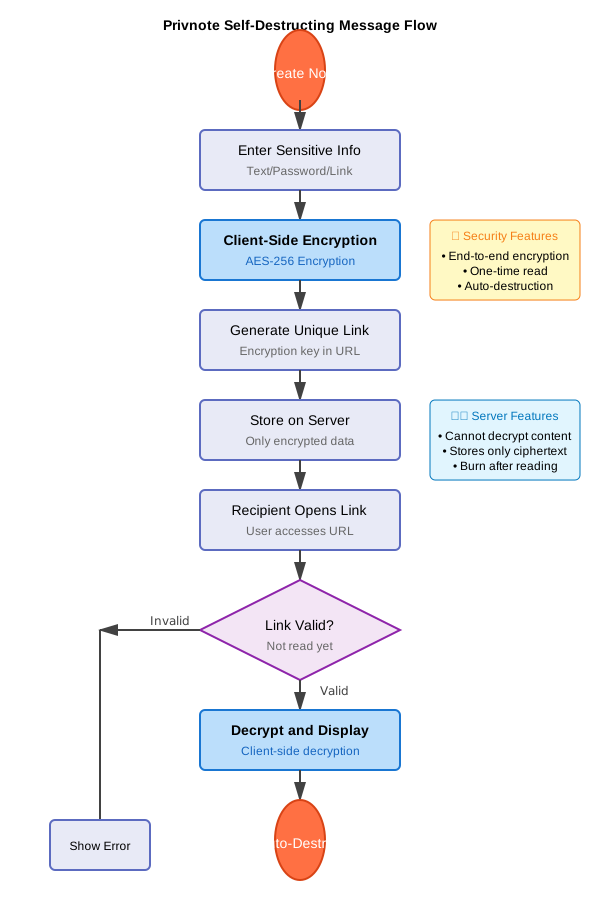
- Write only the small detail you need to share.
- Turn on password protection if the note contains account access or personal information.
- Send the generated link in your usual chat or email.
- Send the password separately if you used one.
- Tell the reader it is a one-time note and should not be forwarded around.
What Not to Use It For
- Long documents or file archives
- Anything you are required to retain formally
- Information that must be reviewed by many people over time
- Situations where screenshots or copying would still be a major risk
Common Mistakes to Avoid
Keep Expectations Realistic
Privnote helps reduce leftover copies on the service side, but it is not magic. A recipient can still copy text, take a photo, or save it manually. Use it as a cleaner sharing method, not as a promise that nothing can ever be captured.
Practical Checklist
- Use it for text, not files
- Share passwords separately when possible
- Keep the note short and specific
- Warn the reader that the link is one-time
- Store anything important in your normal recordkeeping flow